| 1 | 2 | 3 |
| 4 | 5 | 6 |
| 7 | 8 | 9 |
| 10 | 11 | 12 |
| 13 | 14 | 15 |
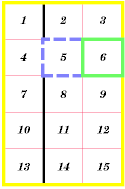
The following example is taken from the CSS2 specification. The table on the left is supposed to be rendered like the image on the right; but as you can see, it is not.
|
|
This appears to be two separate bugs: (a) collapsing borders don't work, (b) border properties on COL elements don't work (possibly related to bug 915).
Source of style and table:
<STYLE TYPE="text/css">
 TABLE          { border-collapse: collapse;
                   border: 5px solid yellow; }
  *#col1         { border: 3px solid black; }
  TD             { border: 1px solid red; padding: 1em;
		   font-size: x-small; font-style: italic; font-weight: bold }
  TD.solid-blue  { border: 5px dashed blue; }
  TD.solid-green { border: 5px solid green; }
</STYLE>

<TABLE>
<COL id="col1"><COL id="col2"><COL id="col3">
<TR id="row1">
    <TD> 1
    <TD> 2
    <TD> 3
</TR>
<TR id="row2">
    <TD> 4
    <TD class="solid-blue"> 5
    <TD class="solid-green"> 6
</TR>
<TR id="row3">
    <TD> 7
    <TD> 8
    <TD> 9
</TR>
<TR id="row4">
    <TD> 10
    <TD> 11
    <TD> 12
</TR>
<TR id="row5">
    <TD> 13
    <TD> 14
    <TD> 15
</TR>
</TABLE>