
In Memorium - Steve Jobs
Listening to some of the podcasts about Steve Jobs death, one question that would come up for people was "which of his products had the strongest impact on you." That is a very hard thing to answer, because most of the time, each product that I used had the biggest impact on my life, right until the next one.
In 1984, I was visiting my cousin Jil, and her family, in California. Jil had a Macintosh. It was 1984, so there was only 1. I wrote my first story on that Mac. It was a true story about a scary experience I had with a bat that was living on their farm. Being able to see the shadowing, outlining and other font effects on the screen made writing the story fun for a 14 year old kid that had never written anything like that before. That was were Apple won me. Right with the very first Macintosh.
I didn't get my own Mac until college. A Mac 2si. This was in the "bad times" when Steve's hand wasn't guiding the process. But even the beige boxes being put out by Apple still ran the magical Mac OS which was always infinitely better than the alternative. My roommates and I had no trouble setting up a network between our computers and playing games against each other. It was not only a bonding experience with them, but also started me down my career path in networking and computer support.
When I graduated, my office only had PC's. I used American Express points to get my first laptop. A PowerBook 100. Even though my desktop computer was more powerful, it became my primary computer, both at home and at work.
At this point, I was keeping my contacts on a sharp wizard. That device was stolen and then I got the first device that really changed the way I did things. The Newton Message Pad. I missed out of the first generation with the handwriting nightmares. My MP130 and then my MP2100 showed me that handheld was the wave of the future. I managed my contacts, my calendar, my to do items, and I ever read books on it. It was only the mid 90's but those devices created the PDA market and even term PDA, foreshadowing the iPhone by more than 10 years.
After a brief stint with a Power Computing clone at my office (which had been kind enough to let me get a Mac), Steve Jobs came back to the fold and not only did I buy my first shares of Apple stock (at $13) but I replaced that clone with a G4 cube, which I still have in working order, more than a decade later.
I had always bought middle of the line computers that I could afford, but when the 17" Titanium PowerBook came out, I went whole hog, top of the line. My father had just passed away. He always bought himself the best, and I decided that this time, so could I. And it was an amazing machine. Absolutely beautiful, and that wasn't even when it was on. I knew then that I'd probably never get a desktop as my own personal computer again.
Then there was the iPod. I hadn't listened to music regularly in ages, and the iPod reintroduced me to my music collection. And then to Audiobooks, which, for the past 10 years has been my number 1 method of consuming literature. I can't tell you how many books I have enjoyed, that I wouldn't have without the iPod.
And then there was the iSight camera. That little accessory that let me be there when my niece was born on the other side of the country. My brother in law was smart enough to turn off the thing for a certain 5 minute inteval, but other than that, I was with my sister in the hours before hand, and I was one of the first people to see my niece, Dylan, at 5 minutes old. I still have screen shots saved of the whole things.
I was in the room when Steve Jobs gave the keynote speech at Macworld expo announcing the iPhone. For my whole life, I will remember him talking about new devices saying "An iPod, a phone, and an Internet communicator" over and over until everyone realized that he was talking about one single device. I just watched that you tube clip (2007 Keynote if you want to look for yourself) and am tearing up, just at the excitement of it all. The iPhone was the greatest piece of technology I had ever touched. it was the first device, since the end of the Newton that I felt was a good replacement. (Yes, I had tried other things like Palms and HPs, always going back to my ancient, but still better Newton.)
And finally, the iPad. And it's a whole new game again. This is the device that I have with me at all times. I read on it. Watch TV on it, sing from my sheet music on it, email, videochat, everything really.
Which of these things had the most impact on my life? The answer is all of them. The answer is, Steve Job had the most impact.
Farewell Steve. I didn't know you personally. I only knew you from your public persona and the devices you brought to us that changed the world. I may not have always agreed with your choices, but it was your own vision that you followed, and that is what brought the world to where it is today, and where it will be 20 years down the road.
Rest in Peace.
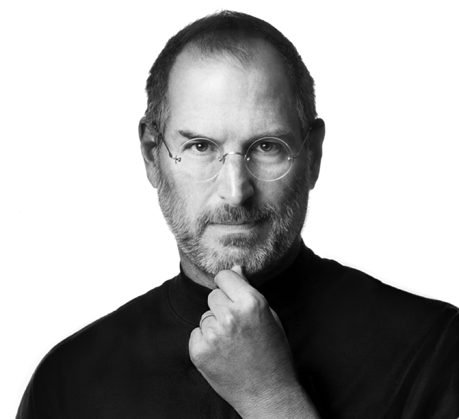
Steve Jobs doesn't know what freedom is.
“...freedom from programs that steal your private data. Freedom from programs that trash your battery. Freedom from porn..."
Let’s look at the definition of Freedom from the built in dictionary in the Mac OS.
The very first item:
“the power or right to act, speak, or think as one wants without hindrance or restraint”
Further down in the definition we get:
“unrestricted use of something”
Mr. Job’s statement about offering freedoms is an oxymoron. Those things aren't freedoms. Exactly the opposite, in fact. They are restrictions.
Book burners could say the same thing. They are offering freedom from smut/heresy/anything-the-book-burner-disagrees-with. Just as one example from the thousands in history, there have been church groups that had book burnings to offer freedom from Harry Potter books
Censorship is not freedom. it is the exact opposite.
Don't get me wrong. It's Apple's platform and they can do with it what they will. I appreciate the precautions that they take in order to give the majority of their customers the best experience possible, but let's be honest here. It's not freedom!
I can only hope that Mr. Jobs doesn’t expand the list of things he wants to offer me freedom from. It’s not a far leap from porn to erotica to classic art containing nudes. Nor is it outside the realm of possibility that he might want to offer me freedom from political satire, or from religious books that aren’t in line with his religion.
Mr. Jobs, I understand your desire to keep apps off the platform that will make it function in a less than optimal way. There is no question that it’s a good thing to block apps that use resources poorly draining the battery or apps that are insecure and put my data at risk.
But how about not censoring content that the government says I legally have the right to consume?
The speed of audiobooks.
I listen to a ton of podcasts, so being able to listen a little faster is invaluable to me. There aren't enough hours in the day for me to listen to everything that I want to, so every little bit helps.
When the iPhone came out I noticed that the books played even faster. There is no fine control over the playback speed. Your choices are Normal, Slow or Fast. But on the iPhone the fast setting is significantly faster than on the iPod. I didn't realize it until I went back to the iPod after using the iPhone. Even speeded up audio seemed almost painfully slow. So, I am a junkie for speeded up audio books and podcasts.
Now, I wanted to get an iPod Nano with h2audio.com waterproof case so my morning swim wouldn't be so boring, but I was curious if the Nano would play at the faster iPhone speed, or the slower iPod speed (which is still faster than normal). I looked, but could not find an answer to that question. So finally I decided to just get the Nano. Even if the speed wasn't what I hoped, it would still be less boring than swimming laps with nothing to listen to. And, it helped that my wife gave it to me for my birthday.

So, here are my results.
The iPod and the Nano play at the same speed as each other. Playing the exact same podcast, in 10 minutes of real time, the Nano and the iPod played 12:30 of content (25% speed increase), while the iPhone played 15:00 of content (50% speed increase).
So, in an hour I can listen to 75 minutes of content on an iPod or 90 minutes of content on the iPhone. Kinda cool.
Anyway, since I couldn't find this information anywhere, I decided to post it here, in case it helps someone else.
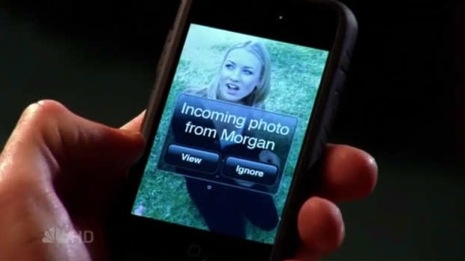
Future iPhone feature seen on Chuck...
It came in like a MMS photo, and he got the message:
"Incoming Photo from Morgan. View - Ignore"
It looked just like when text messages come in, and it looked really good. Does the TV studio have access to a beta of a future iPhone feature, or is it a really nice job of video fakery?
IMAP mail works right on iPhone
One of the issues that I mentioned earlier was that the iPhone didn't access the subfolders of my inbox on my IMAP mail server. It turns out that there is a way to fix this.
In the mail settings, after clicking (tapping?) on the account in question, there is an advanced option where I needed to put in "INBOX" as my IMAP prefix.
Works perfectly. Thanks to superg on MacOSXHints.com for this tip.

Monday night movies going strong. (Only a little about the iPhone here...)
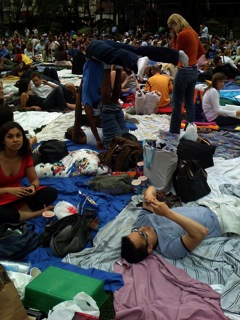
Last night was Paper Moon at Bryant Park. It was a great time. Here are a few pics taken from the iPhone. More pics here...
Incidentally, under heavy usage in the park, the iPhone went from full charge to 20% battery warning in about 5 hours.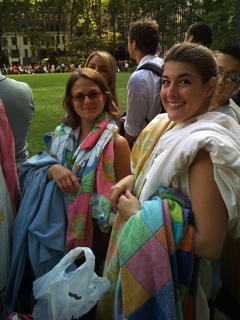


Correction: Yet another iPhone post.
It seems like the iPhone implementation is better than I thought. I just had a bad audio file that was distorting the sound. It's still a little faster than the original iPod's speeded up setting, enough that you can tell it's speeded up, but it's not distorted.
Also, the iPhone doesn't like smartplaylists as much as the iPod did. On my iPod, I had a playlist of "unheard audiobooks" that items would disappear from as I listened to them. On the iPhone, they don't disappear until after a sync.
These are minor points. Don't get me wrong. The iPhone is the greatest piece of technology I have ever owned, and i love it. But I still like to comment on the issues that I find.
More on iPhone.
Some other things I have noticed.
1. There is no search feature. If you want to find a contact, you have to scroll to them. If you want to call your friend, JJ, for example, you better remember that his real name is actually Sam (JJ) Smith before you try, cause there is no way to find JJ. Even if you put JJ into the Nickname field, the autofill addresses of SMS don't find it.
2. While the iPhone does support speeded up playback of Audiobooks, the implementation is flawed. On the iPod, the speeded up playback sounded perfect. If you didn't know it was speeded up, you would just think the speakers were speaking quickly. The iPhone's faster setting plays back the sound a little faster than the iPod's on the same setting, but the sound is very distorted. Still understandable, but not very pleasant. I'll try to sample some sounds in the next few days, to illustrate.
iPhone impressions.
The iPhone is terrific. Over the next few days there will be tons of posts talking about the good and the bad. I don't want to repeat all the common comments. My impressions that the screen is great and the typing takes getting used to are just a few that match the general opinion. Here are some comments I have that I haven't seen posted yet.
1. I am disappointed that there doesn't seem to be a manual way to add iPod content to the iPhone. You MUST use the sync features. That is fine for people with one computer, but I have a computer at home, and a computer at work, and I like to add content from both locations. Now I can't. Fortunately, that's a software issue that will hopefully be fixed in an update.
2. On syncing, it recognizes playlists of TV shows, and Playlists of Music, but you have to select movies manually. You can't sync a specific playlist of movies unless they are labeled as TV Shows of Music Videos.
3. When you watch a TV Show on it, at the end of the show the iPhone asks if you want to delete the show to save space. Then when you sync, it doesn't re-add the show to the iPhone, but it does increment the playcount on the computer.
4. Mail accessed my IMAP server without a problem, but only accessed the main inbox and not any subfolders.
5. Speakerphone is so quiet that it's almost unusable.
That's it for now. More as I play...
iPhone Mania...
All week people were asking me, "Are you in the line yet?" Of course, they were referring to the line at the Apple Store that formed on Monday, for Friday's release of the iPhone at 6pm. Well, finally, after visiting with friends in the line Thursday night, I showed up at about 8am on Friday for the day. I was number 70 in line and I had an absolute blast.
The friends I was with were Lesa Snider King and Shawn King. They both have blogs...
Lesa's Blog
Shawn's Blog
Everyone on the line was nice and we had a good time, just hanging out all day. Also, Shawn was there working for Macworld.com and we shot a lot of video for the site.
There were tons of press there and I got interviewed on my way out of the store by a few news outlets. I haven't seen it yet, but a few people said they saw me on NBC. I'll keep an eye out. The most common question by the press was "Was it worth waiting on the line?" It was a sort of silly question, because I hadn't been able to turn the iPhone yet, but I have to say, the experience at the Apple Store was definitely worth the wait. Walking in the store they had all the store employees applauding the customers. Screaming, hooting, hollering and making us feel like Rock Stars. It seems a little hokey for the first second and then I got swept up in it and was on top of the world. It was great fun. Bravo Apple for taking the best shopping experience and improving it even more.
Of course, maybe I didn't need to wait on the line. My mom showed up at about 7:30, waited in the line for about 1 minute and got the same treatment. Still, the line was fun too.  iPhone impressions coming next...
Your Mac Life has moved.
If you have any interest in Macintosh's or Apple products, I highly recommend the show. Each week they talk about all the current news, interview interesting people from all across the tech spectrum and give great tips.
Home from Macworld Expo.
That pretty much sums it up. I'll have to make due enjoying everyone else's pics. Thanks to the Your Mac Life community for a great time and for the surrogate photography.
Apple's new "Hi-Fi" speakers for iPod misses the boat.
Essentially, it is an iPod dock with speakers for $350. Big whoop. There are already docks with speakers. Where they went wrong (in my opinion) is that they didn't build Airport Express functionality into it. Not full Airport functionality, but wireless connectivity and AirTunes. Airtunes allows you to send music from your computer to the device over your home network
Sure, you can plug an Airport Express into it, but one of the "selling points" that Apple has on their web site is
That is defeated by needing to plug it into an Airport Express."No need to find a place to hide an unsightly power brick, as iPod Hi-Fi houses all power components internally."
My suggestion would be (Apple, are you listening?), if you aren't going to include Airport connectivity and Airtunes by default, offer a second unit with it built in.
I don't mind the extra cost. The Airport Express is $129. Apple could probably build in the functionality and only charge an extra $100 for it. The $29 discount would make sense because you wouldn't need to include the ethernet port, printer sharing or base station functionality. But even if they charged the full $129 extra, it would be better to have the whole thing as 1 unit.
It's Here!!!
Universal Binary applications run really fast. Older PowerPC binaries running under Rosetta don't suck. For the most part they are the same speed that they were on my old Powerbook, and I look forward to the updates that will bring them up to "Zippy" status.
I posted some more specific observations in this thread on the Your Mac Life forums.
New computer really almost here....
However, today I got notification that it's already shipped, and is due to arrive 2/24. Already an indicator of the speed I can expect from the new computer.
New computer not almost here....
We have upgraded your MacBook Pro from a 1.83GHz processor to a 2.0GHz processor at no additional cost! We anticipate shipping your upgraded order by February 28, 2006.
So I have a bit longer to wait. I am happy about the speed bump, though and would take that deal any day.
New computer almost here...
And, hubba hubba! They've decided to ship it with a faster processor than was originally promised. Happy Valentines day!!!
Macworld Expo
Oh yeah. Also, Apple announced some cool new stuff.